
TL;DR
Wireless charging is not the topic here. This guide is about something most people never think about until they need it fast: saving and finding old AI chatbot conversations in a way that is secure, organized, and defensible.
If your chatbot helps customers, supports employees, or answers questions on your site, it creates a trail of data. That data can build trust and improve quality, but it can also create privacy and security risk if you store it carelessly.
Quick answer: What is an AI chatbot conversation archive?
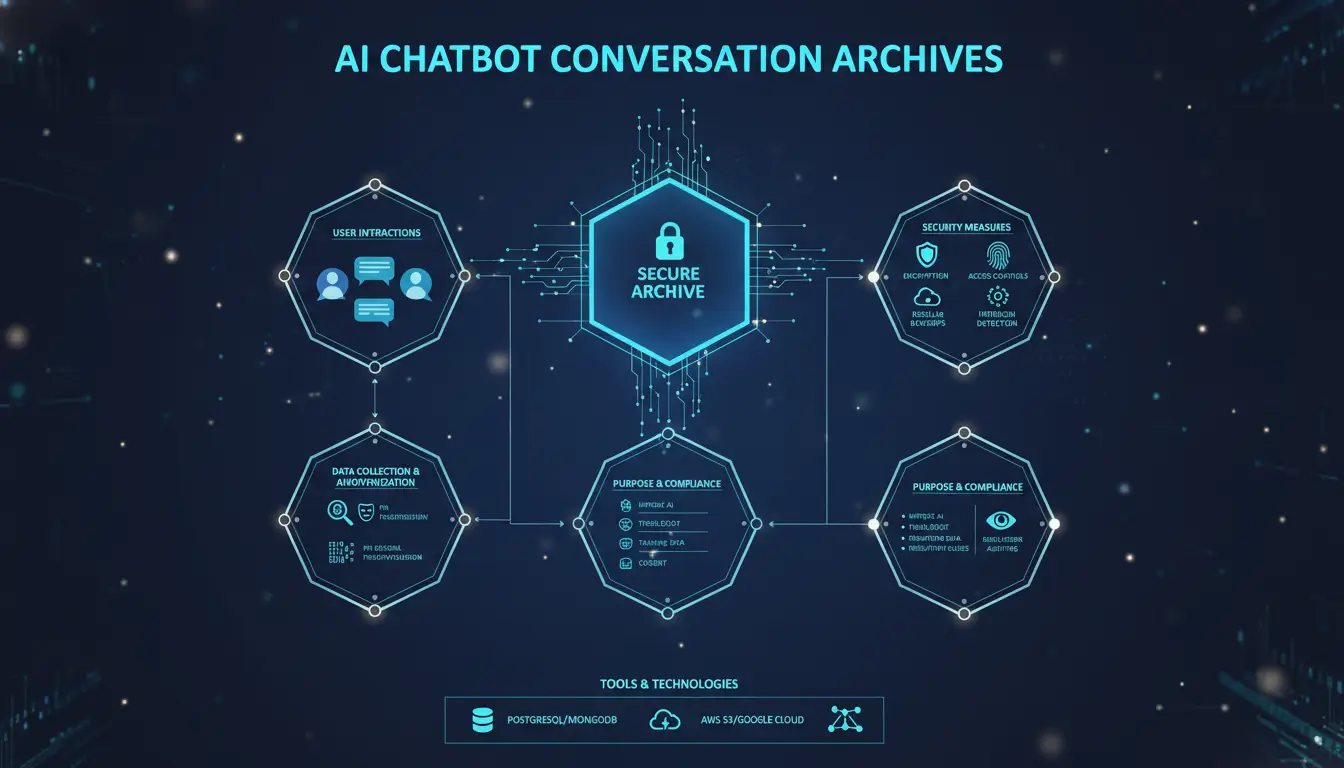
An AI chatbot conversation archive is a secure, searchable system of record for chatbot messages and related metadata (timestamps, user or session IDs, tool calls, and audit events) with rules for retention, access, export, and deletion. It is not the same as hiding a chat thread in a user interface.
What an AI chatbot conversation archive includes
A real archive usually contains more than the chat text. Most teams eventually need at least:
- Message content (user and assistant messages, plus system prompts if applicable)
- Metadata (timestamps, session IDs, channel, language, tenant, escalation flags)
- Operational context (model/version, temperature, tools used, retrieval hits)
- Governance events (retention changes, legal holds, exports, deletions)
This is similar to the way mature log management treats logs as security and operational evidence, not just debugging noise.
Archiving vs. deleting in consumer tools: Some AI apps let you “archive” a chat to hide it, but that does not mean it is deleted or governed the way a compliance archive is. For example, consumer chat features can keep chats until you delete them, and deletion may involve a retention window.
Why archives matter
Most teams start thinking about archiving for one of four reasons:
Quality and troubleshooting. When a chatbot gives a wrong answer, logs help you reproduce what happened and fix root causes (bad prompt, bad retrieval, unexpected user input). That is a core reason observability platforms exist.
Customer insight. Chat transcripts show how people actually ask questions, where they get stuck, and what content is missing from your site or help center.
Security investigations. If someone tries prompt injection, data exfiltration, or account abuse, transcripts and audit logs support incident response and forensics. OWASP’s LLM Top 10 highlights prompt injection and sensitive data risks that benefit from strong monitoring and logging controls.
Privacy and compliance. If you store personal data, you need to control access, justify retention, and honor deletion/rights requests where applicable. The FTC’s business guidance and California privacy rules both emphasize minimizing and retaining data only as needed.
What to store and what not to store
A safe archive design starts by deciding what you truly need.
Store this (in most cases)
- The minimal transcript required to debug and improve the experience (often: user message + assistant reply + timestamp).
- A stable conversation identifier (so you can export or delete one thread cleanly).
- Outcome metadata (resolved, escalated to human, error type, feedback rating).
Avoid storing this by default
- Sensitive identifiers (full SSNs, full payment card data, passwords, authentication secrets).
- Unnecessary free-text fields that invite oversharing (especially for public-facing bots).
- Full internal documents pasted into chat when a reference link would work.
This maps to “scale down” guidance: don’t collect or keep sensitive data unless you have a legitimate need, and keep it only as long as necessary.
If you need to store sensitive data, reduce risk
Use a privacy-first pipeline:
- Redaction or detection for PII (names, emails, phone numbers, account IDs) and sensitive categories.
- Pseudonymization (store a user key, not raw identity fields).
- Separate storage zones: keep raw transcripts in controlled storage; keep indexes and analytics in a less sensitive, de-identified form where possible.
Security and governance essentials for a defensible archive
Security for conversation archives is not just “use encryption.” It is a set of layered controls that make the archive reliable evidence and reduce breach impact.
Access controls and audit trails
At minimum:
- Least privilege: only staff with a real need should see transcripts.
- Role-based access control (RBAC): separate support access from engineering access from compliance/legal access.
- Audit logging for who accessed what, when, and why (and protect those logs like security logs).
Encryption and key management
A common baseline:
- Encrypt in transit using modern TLS configurations (NIST provides guidance for TLS implementations).
- Encrypt at rest using strong, standardized algorithms (AES is a common FIPS-approved reference standard).
- Manage keys deliberately (rotation, separation of duties, recovery procedures); NIST’s key management recommendations are a useful reference point.
Secure search and indexing without creating a second data leak
Search is where many archives accidentally double their risk.
Most teams create at least one of these:
- Keyword/full-text index (fast exact lookup)
- Vector/semantic index (find “similar meaning” conversations)
If you do both, you have “hybrid search,” which can be more effective for conversational data because users search by meaning, not exact words.
But indexing creates copies of data. So your deletion program must remove:
- the raw transcript,
- the keyword index entry,
- embeddings and vector entries,
- cached analytics datasets,
- and any derived training/evaluation sets built from that transcript.
Retention policies, legal holds, and deletion
Retention is not “pick a number.” It is “tie storage time to purpose.”
- California regulations require collection/use/retention/sharing to be reasonably necessary and proportionate for the stated purpose (or a compatible disclosed purpose).
- CCPA/CPRA frameworks also emphasize consumer rights like deletion and correction, which implicate how you search and remove data from archives.
If your bot intersects with healthcare data, HIPAA may apply. HIPAA’s Security Rule describes administrative/physical/technical safeguards for electronic protected health information.
HIPAA also includes documentation retention requirements (for certain required documentation such as policies/procedures) of six years from creation or last effective date, whichever is later.
Practical takeaway: build a retention schedule that distinguishes:
- “hot” data (recent, needed for rapid troubleshooting)
- “warm” data (needed for trend analysis or longer QA loops)
- “cold” data (kept only when justified by compliance, disputes, or a documented business need)
Also build an override for legal hold, where deletion is suspended when needed for legal or investigative reasons. Enterprise retention systems sometimes implement this explicitly, including warnings that user-visible chat history is not proof content is deleted.
Export and user rights workflows
Whether you are responding to internal governance needs, a customer request, or a legal inquiry, you need controlled export.
Even consumer AI products provide export to help users retrieve their data (usually delivered as a downloadable file).
For business systems, exports should be:
- scoped (single conversation ID, user ID, date range),
- logged (who exported, approval ticket),
- encrypted in storage and transit,
- and time-limited (temporary download links or expiring tokens).
Tools and architectures: open-source vs commercial options
There is no single “best” tool, because archiving needs range from lightweight debugging to high-rigor compliance records. The most useful way to compare options is by what they help you do: capture logs, search them, control retention, and prove who accessed them.
Comparison Table: archiving/observability tools that can support conversation archives
Costs and features change; numbers below reflect vendor-published pages where available.
| Tool | Type | Open-source? | Pricing signal | Strengths for archiving | Compliance/security notes |
|---|---|---|---|---|---|
| Langfuse | LLM observability + prompt workflow | Yes (self-host) | Self-host cost = your infrastructure | Good for capturing traces and debugging; self-hosting helps data control | Self-hosting can support stricter data residency and access control if implemented carefully |
| Helicone | Observability + gateway logging | Mixed (OSS + hosted) | Hosted plans list storage and monthly pricing | Easy request/response logging; usage and debugging focus | Hosted plans imply trusting a vendor with logs unless self-hosted |
| Arize Phoenix | Observability + evaluation | Yes | Free/open-source; also part of broader Arize ecosystem | Good for tracing/evaluation workflows; supports self-host setup patterns | Self-host helps keep sensitive transcripts in your environment |
| LangSmith | Agent/LLM observability + evals | No | Usage-based tracing with defined retention tiers | Export to S3; detailed tracing; structured workflows | Published retention differences matter when transcripts contain sensitive data |
| Datadog LLM Observability | Enterprise monitoring for LLM apps | No | Pricing varies by Datadog plan | Unified infra + LLM monitoring; integrations; experiments | Suitable for orgs already using Datadog; consider data access policies for logs |
| PromptLayer | Prompt logging + analytics | No | Free plan with stated retention; paid tiers available | Strong logging and metadata for prompt runs | Free plan retention is limited; ensure retention matches your policy needs |
Executive summary
An “AI chatbot conversation archive” is a governed, searchable, and secure record of chatbot interactions (messages plus metadata) that you can use for quality improvements, audits, and compliance. The keyword is governed: an archive is more than a chat history panel or a basic log table. Done right, it includes retention rules, access controls, encryption, audit trails, and reliable deletion workflows.
From a 2026 search perspective, the best path to organic visibility is straightforward: follow foundational SEO best practices and publish clear, extractable answers that both people and answer engines can reuse. Google’s guidance for AI Overviews and AI Mode is that the same core SEO practices still apply, without “special optimizations” required to appear there.
Frequently Asked Questions (FAQs)
It is a secure, searchable record of AI chatbot transcripts plus metadata, managed with rules for retention, access, export, and deletion.
Capture transcripts at ingestion, redact sensitive data, encrypt storage, index the redacted form for search, enforce RBAC and auditing, then run retention and deletion jobs on a schedule.
Store them only as long as necessary for your stated purpose, then delete. California privacy rules require retention to be reasonably necessary and proportionate to the purpose.
Avoid passwords, authentication secrets, and unnecessary sensitive identifiers. Minimize collection and keep only what you need.
Deletion must propagate across raw transcripts, search indexes, embeddings, cached datasets, and exports. Also account for legal holds that can suspend deletion.
